[ Template ]
One-page LaTeX resume template
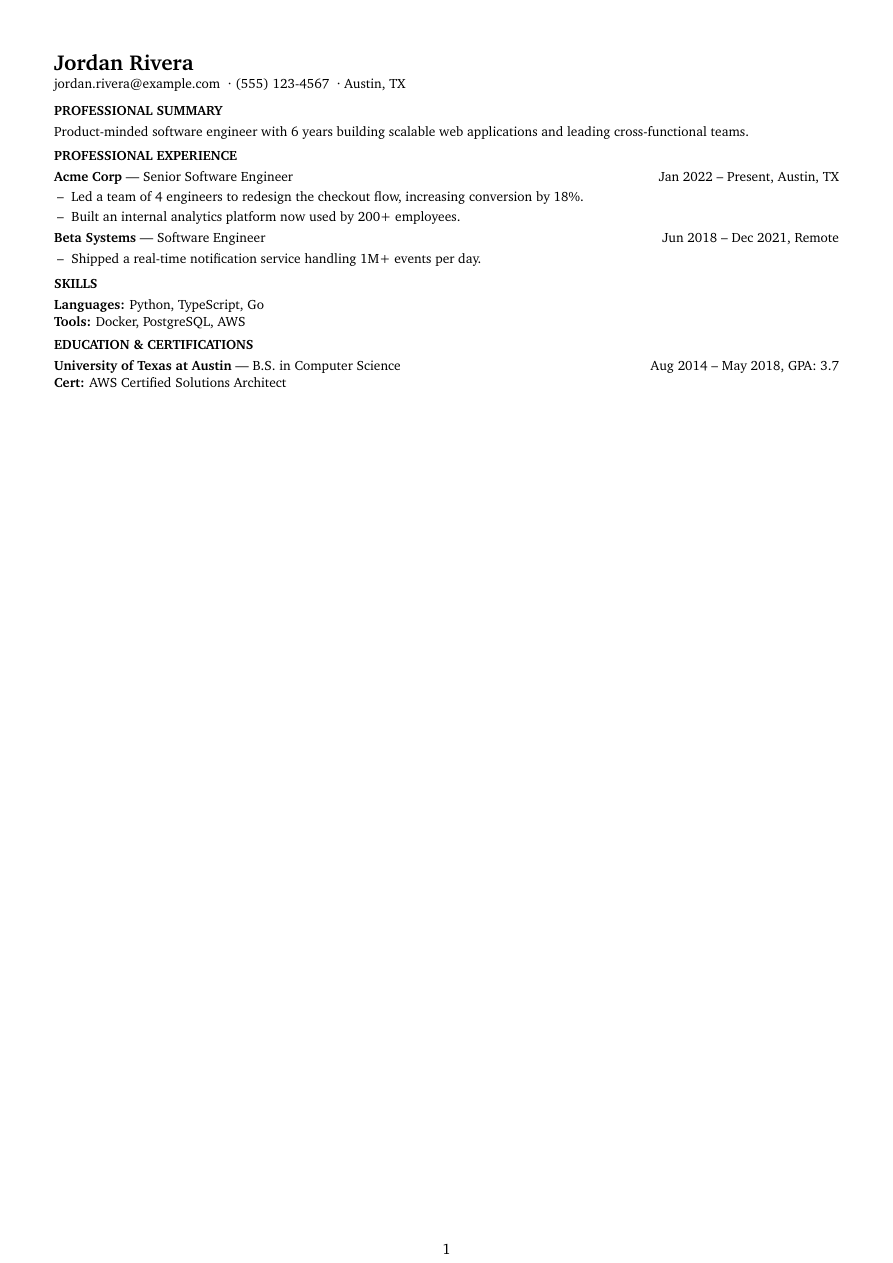
Compact exists for one reason: fitting more on a page without it looking cramped. Smaller margins (0.5in), 2pt paragraph spacing, dash bullets instead of round ones, and no rules or color competing with the content — it's the leanest template in Refyn's library, deliberately.
It suits people with real length to their experience — ten-plus years, several roles — who don't want to cut good material just to hit one page, or who've been told to keep a resume to one page and are fighting the layout more than the writing.
It's not the template for a first resume with plenty of white space to spare — Graduate is built for that instead. Compact is for when you have more to say than a page usually holds.
Who it's for
- You have 8+ years of experience and are being told to keep it to one page.
- You want density without your resume reading as cramped or hard to scan.
- You'd rather the layout give up its margins than you give up a bullet point.
Works with ATS software
Compact is single-column LaTeX with a full text layer, same as every Refyn template — the tight spacing is a visual choice (parskip, itemsep, margins), not a structural one, so it parses identically to a roomier template. Charter, its body font, is a standard serif with no ligature or rendering quirks that would trip up text extraction.
View the full LaTeX source
% ---------- Tagged PDF (optional) ----------
% Uncomment the next line for a tagged PDF: real reading order and list
% semantics for screen readers. Works with pdflatex on TeX Live 2023+.
% The LaTeX tagging project still labels this experimental, so it is off
% by default.
% \DocumentMetadata{lang=en-US, testphase={phase-III}}

\documentclass[a4paper,10pt]{article}

% -------------------- Packages --------------------
\usepackage[a4paper,margin=0.5in]{geometry}
\usepackage{enumitem}
\usepackage[hidelinks]{hyperref}
\usepackage{charter}
\usepackage{etoolbox}

% -------------------- Formatting --------------------
% The density template — its whole purpose is fitting more on one page.
\setlength{\parindent}{0pt}
\setlength{\parskip}{2pt}
\linespread{1.0}
\setlist[itemize]{label=--,itemsep=0pt,topsep=1pt,leftmargin=0.16in}
\sloppy
\raggedbottom

% -------------------- Semantic macros --------------------
% render.py (app/services/conversion/render.py) only ever emits calls to the 11
% macros below, with data already massaged (dates joined, "Present" resolved,
% link labels derived, etc.) but with ALL visual decisions — bold/italic, hfill
% alignment, icons, separators, list styling, gap sizes — owned here. See the
% macro contract in that module's docstring before changing signatures.
% Every template MUST define all 11, including \closebullets and \entrygap.
%
% No titlesec/xcolor here — sections are plain bold-uppercase text with no
% rules, keeping this the leanest package list of the five templates.

\newtoggle{citemnotfirst}
\newtoggle{bulletsopen}
\newtoggle{skilllinenotfirst}

% \closebullets closes the itemize list \rbullet opens. render.py calls it
% right after emitting the \rbullet run for an entry. \AtEndDocument is a
% defensive backstop only, in case a future call site forgets.
\newcommand{\closebullets}{%
  \iftoggle{bulletsopen}{\end{itemize}\togglefalse{bulletsopen}}{}%
}
\AtEndDocument{\closebullets}

% Left-aligned, smaller than the other templates' headers — this template
% never spends vertical space it doesn't have to.
\newcommand{\resumeheader}[3]{%
  \noindent{\Large\bfseries #1}\ifblank{#2}{}{\quad\textit{#2}}\\[1pt]
  \noindent{\small\togglefalse{citemnotfirst}#3\par}
  \vspace{2pt}
}

% No icons — plain label, middle-dot separated (\textperiodcentered is core
% LaTeX, no extra package needed). #1 (kind) is only checked for "email" so
% that case gets a real mailto: link; everything else just hyperlinks #2 when
% it's non-empty.
\newcommand{\citem}[3]{%
  \iftoggle{citemnotfirst}{ \textperiodcentered\ }{\toggletrue{citemnotfirst}}%
  \ifstrequal{#1}{email}{\href{mailto:#2}{#3}}{\ifblank{#2}{#3}{\href{#2}{#3}}}%
}

% Bold title, one step up from body size for contrast against the (now
% correctly normalsize) body text. No rule, minimal space above/below —
% density still comes from that tight spacing, not from a shrunk title.
\newcommand{\sectionstart}[1]{%
  \togglefalse{skilllinenotfirst}%
  \par\vspace{3pt}\noindent{\large\bfseries #1\par}\vspace{1pt}%
}

% One line where possible: "Company --- Title" bold/regular, dates
% right-flushed with location appended after a comma when present.
\newcommand{\job}[4]{%
  \textbf{#2} --- #1 \hfill #4\ifblank{#3}{}{, #3}%
}

\newcommand{\rbullet}[1]{%
  \iftoggle{bulletsopen}{}{\begin{itemize}\toggletrue{bulletsopen}}%
  \item #1%
}

\newcommand{\skillline}[2]{%
  \iftoggle{skilllinenotfirst}{\\}{\toggletrue{skilllinenotfirst}}%
  \textbf{#1:} #2%
}

\newcommand{\edu}[4]{%
  \textbf{#1} --- #2 \hfill #3\ifblank{#4}{}{, GPA: #4}%
}

\newcommand{\cert}[1]{\\ \textbf{Cert:} #1}

\newcommand{\project}[4]{%
  \textbf{#1}\ifblank{#2}{}{ -- #2}\ifblank{#3}{}{ \hfill \href{#3}{[#4]}}%
}

% Minimal/empty — the density template proves \entrygap needed to be a macro:
% every other template puts real space here, Compact spends none.
\newcommand{\entrygap}{}

% -------------------- Document --------------------

\begin{document}

\resumeheader{Jordan Rivera}{}{%
\citem{email}{jordan.rivera@example.com}{jordan.rivera@example.com}
\citem{phone}{}{(555) 123-4567}
\citem{location}{}{Austin, TX}}

\sectionstart{PROFESSIONAL SUMMARY}
Product-minded software engineer with 6 years building scalable web applications and leading cross-functional teams.

\sectionstart{PROFESSIONAL EXPERIENCE}
\job{Senior Software Engineer}{Acme Corp}{Austin, TX}{Jan 2022 -- Present}
\rbullet{Led a team of 4 engineers to redesign the checkout flow, increasing conversion by 18\%.}
\rbullet{Built an internal analytics platform now used by 200+ employees.}
\closebullets
\entrygap

\job{Software Engineer}{Beta Systems}{Remote}{Jun 2018 -- Dec 2021}
\rbullet{Shipped a real-time notification service handling 1M+ events per day.}
\closebullets

\sectionstart{SKILLS}
\skillline{Languages}{Python, TypeScript, Go}
\skillline{Tools}{Docker, PostgreSQL, AWS}

\sectionstart{EDUCATION \& CERTIFICATIONS}
\edu{University of Texas at Austin}{B.S. in Computer Science}{Aug 2014 -- May 2018}{3.7}
\cert{AWS Certified Solutions Architect}

\end{document}
Free to download and use anywhere. Compiles with pdflatex.
Common questions
Will a dense one-page resume hurt my ATS score?
No — density is a visual choice (spacing and margins), and the underlying text layer is the same clean, single-column format as Refyn's other templates. Parsers read the words, not the whitespace.
How much can Compact actually fit on one page?
It depends on your content, but it's built to hold roughly ten years of experience across several roles without truncating bullets — noticeably more than Classic or Accent at the same font size.
Should I use Compact or just cut content to fit another template?
If you're already cutting real accomplishments to make a page work, try Compact first — it buys back space through spacing, not by making you delete good material.
Can Compact run to two pages if I have too much content?
Yes, nothing forces it to one page — if your content overflows, it just continues to a second page. For a resume built for length, Academic is the better fit.